People love PosterMyWall






0+ high converting pamphlets designed for every need


Katrina Conrad runs Conrad Builds, a diversity-compliant consulting firm in Boston working mostly in construction and the building trades. Her team of five connects contractors with work-ready people and has assisted over 200 companies. A good deal of her marketing happens offline, by choice, because the people she most wants to reach are not necessarily going to find her through a search.
So she targets footfall. Her team hands out printed material in pedestrian areas and, deliberately, at the local bus and train depots. The thinking behind it is worth borrowing: what you hand someone is only enough to introduce you, but the commute that follows is twenty minutes of nothing to do. A QR code on the page takes them from that introduction to the full picture of her services, events, and training while they are sitting on the bus. By the time they get off, she is not a stranger. She pairs it with email newsletters built from the same designs, sent around 30 days ahead so her events are well attended.
You can build the same two-stage piece. Lay it out with brochure and pamphlet templates, which give you the panels to introduce yourself on the outside and explain properly on the inside. Add a QR code so the reader can go deeper the moment they are interested, and send the same artwork to your list as an email campaign.
We believe design and marketing costs shouldn't break the bank. That's why we pack a punch in one affordable solution. 💪
On multiple apps


You save $119 with one subscription
Phatha ukukhangisa kwakho kusuka enkundleni eyodwa elula futhi esebenzisa i-AI. Klama usebenzisa izinkulungwane zamathempulethi amahhala, uthengise amathikithi emicimbi yakho, bese ushicilela ezinkundleni zokuxhumana, nge-imeyili, kuwebhu, nokunye.
Bona lokho okuthandwa ngabalandeli bakho ngolwazi lokubandakanyeka kumaphosti akho ezinkundla zokuxhumana nemikhankaso ye-imeyili. Sebenzisa lolu lwazi ukuze uthuthukise isu lakho lokukhangisa futhi wenze okuqukethwe okuletha imiphumela.
Vumela i-AI iphathe umsebenzi onzima: khiqiza imiklamo, izithombe, namavidiyo ngemizuzwana; guqula usayizi ukuze kulingane nanoma yikuphi, bese uhlela kusengaphambili okuqukethwe ukuze kusetshenziswe kamuva. Ngeamapulani ashibhile nezaphulelo ezinkulu zamaqembu, ukwenza umlingo wokukhangisa neqembu lakho akuzange kube lula kangaka.
Choose from thousands of professionally designed templates for any business, event, or occasion.
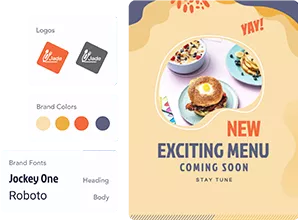
Add your logo, images, videos, fonts, stickers, audio clips, and more. Use Brand Kits for consistent, on-brand designs.
Download for free or purchase high-res files. Upgrade to PosterMyWall Premium plans for unlimited high quality image and video downloads, plus the full AI suite.
Publish to Facebook, X (Twitter), Instagram, or send via email campaigns, embed on websites, or display on digital screens.

Create and edit with AI prompts

Unlimited hi-res on-brand downloads.

Post, caption, and schedule in one go.

Event pages, ticketing and promotions

Amathempulethi angaphezu kuka-5,220. Ama-imeyili angu-10,000 ngenyanga.

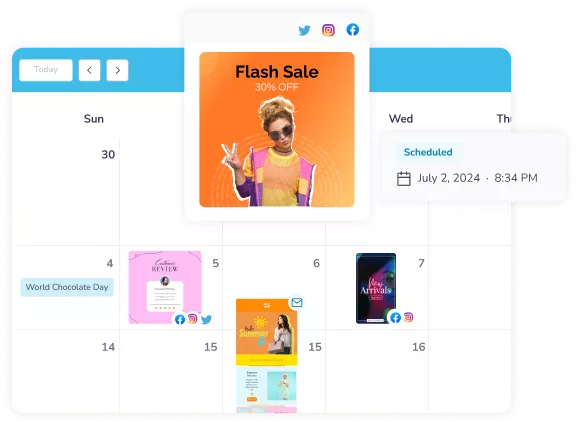
Plan every post and email in one calendar.









 Canva vs PosterMyWall
 VistaCreate vs PosterMyWall
 Adobe Express vs PosterMyWall
 Piktochart vs PosterMyWall
 Snappa vs PosterMyWall
 Fotor vs PosterMyWall
 Placeit vs PosterMyWall
 Visme vs PosterMyWall
 Venngage vs PosterMyWall
 Buffer vs PosterMyWall
 Hootsuite vs PosterMyWall
 Sprout Social vs PosterMyWall
 Later vs PosterMyWall
 Agorapulse vs PosterMyWall
 Zoho Social vs PosterMyWall
 Coschedule vs PosterMyWall
 Sendible vs PosterMyWall
 Loomly vs PosterMyWall
 Stripo vs PosterMyWall
 Mailchimp vs PosterMyWall
 Constant Contact vs PosterMyWall
 Brevo vs PosterMyWall
 GetResponse vs PosterMyWall
 Kit vs PosterMyWall
 Moosend vs PosterMyWall
 Omnisend vs PosterMyWall
GetResponse vs PosterMyWall
Omnisend vs PosterMyWall
GetResponse vs PosterMyWall
 Eventbrite vs PosterMyWall
 Evently vs PosterMyWall
 Facebook Events vs PosterMyWall

Gradient by PosterMyWall



© 2026 250 Mils LLC. Wonke Amalungelo Agodliwe.